
Views: 222 Author: Tina Publish Time: 2026-01-03 Origin: Site


Content Menu
● Why Pentair Sand Needs Changing
● Tools, Materials, and Safety Prep
● Step‑by‑Step: Removing Old Sand
>> Shut off and depressurize the system
>> Drain water from the filter tank
>> Remove the multiport valve or dome lid
>> Vacuum or scoop out old sand
● Inspecting Internals and Preparing the Tank
>> Check laterals, standpipe, and tank
>> Reinstall the internal assembly
● Adding New Sand to a Pentair Filter
>> Confirm sand type and quantity
>> Protect the standpipe and fill slowly
● Reassembly, Backwash, and Start‑Up
>> Reinstall valve or dome and reconnect plumbing
>> Backwash and rinse the new sand
● After‑Care and How Often to Change Sand
● FAQs About Changing Sand in a Pentair Pool Filter
>> 1. How often should sand be changed in a Pentair filter?
>> 2. What kind of sand does a Pentair pool filter use?
>> 3. How do I know how much sand my Pentair filter needs?
>> 4. Can I use filter balls or glass media instead of sand in a Pentair filter?
>> 5. What happens if sand gets into my pool after a sand change?
>> 6. Is changing sand in a Pentair filter a DIY job or should I hire a professional?
Changing the sand in a Pentair pool filter is a medium‑level DIY job that most pool owners can finish in a few hours with basic tools, careful safety steps, and the right #20 silica sand. Done correctly, new sand restores filtration efficiency, improves water clarity, and protects both the pump and filter from unnecessary stress.[1][2][3][4]
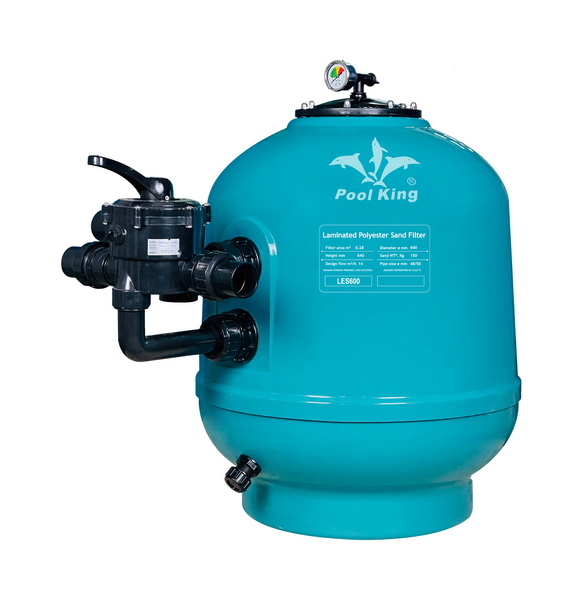
Over time, the sharp edges of filter sand round off and become less effective at trapping dirt, making water cloudy and shortening the time between backwashes. Oils, fine particles, and scale also clog the sand bed, causing channeling, poor filtration, and sometimes sand blow‑back into the pool.[2][3][11][12]
Most pool professionals recommend changing sand roughly every 3–5 years, or sooner if the filter cannot keep water clear despite proper chemistry and regular backwashing. Signs it is time include: persistent cloudy water, more algae problems, sand on the pool floor, and pressure behavior that no longer matches normal backwash cycles.[3][4][12][13]
Before starting, plan for several hours of work and clear access around the filter, including space to remove and dump heavy wet sand. For most Pentair sand filters, you will need:[14][2]
- Correct filter sand/media
- Standard media is #20 silica “pool filter sand,” typically 0.45–0.55 mm grain size.[15][2]
- Check Pentair data or label for required sand weight (for example, TR100 Triton II uses about 600 lbs of sand, while various Tagelus and Sand Dollar models use 100–350 lbs).[6][16][5]
- Basic tools and accessories
- Screwdrivers or nut drivers to remove clamp screws or valve bolts.[8][2]
- Adjustable pliers or wrench for unions and drain plugs.[8]
- Shop‑vac or small bucket/cup to remove old sand from the tank.[14]
- Tape (duct or electrical) to cover the standpipe opening while adding new sand.[1]
- Garden hose for rinsing tank, internals, and equipment pad.[2]
- Optional media components
- Some Pentair filters, especially certain Triton models, use pea gravel over the laterals with sand on top; check the label or chart to see if gravel is required.[10][5][15]
- If pea gravel is specified, add it first and then the correct amount of sand.[5][10]
- Safety precautions
- Turn off power at the pump switch and at the circuit breaker to prevent accidental start‑up.[2]
- Release all pressure using the filter's air relief valve before opening any clamps or lids.[1][2]
- Wear eye protection, gloves, and a dust mask when handling dry sand and cleaning old media.[3]
The exact layout varies slightly between top‑mount filters (multiport valve on top) and side‑mount filters (side valve plus large dome lid), but the removal process is similar.[6][8]
- Turn the pump off and lock out power at the breaker so it cannot be switched on while the filter is open.[2]
- Set the multiport valve to “CLOSED” or move suction/return valves to isolate the filter, then open the air relief valve to release pressure.[1][2]
- Remove the drain plug or cap at the bottom of the tank to let water flow out completely.[6][2]
- Use a short hose to direct water away from the pad if needed, and wait until the tank has fully drained before opening the top or dome.[1][2]
- For top‑mount Pentair filters, loosen and remove the clamp band or bolts that secure the multiport valve to the tank.[16][8]
- Carefully disconnect unions or plumbing from the valve body and lift the valve straight up, taking care not to bend the standpipe.[8][14]
- For side‑mount Triton II filters, loosen the dome clamp and lift off the top lid to expose the sand and internals.[8][6]
- Photograph the internal layout before proceeding so reassembly is easier after the sand change.[8]
- Remove sand with a small scoop or plastic cup, or use a shop‑vac rated for wet/dry material to speed up the job.[14][2]
- Work carefully around the standpipe and laterals so they are not cracked or dislodged, especially near the bottom where plastic parts are located.[1][8]
When you are close to the bottom, gently expose the lateral assembly; in many Pentair designs the standpipe and laterals can be lifted out as one piece for inspection. Old sand can be distributed in the yard away from drains or disposed of according to local guidelines, since it is essentially silica mixed with dirt.[3][2][8][1]
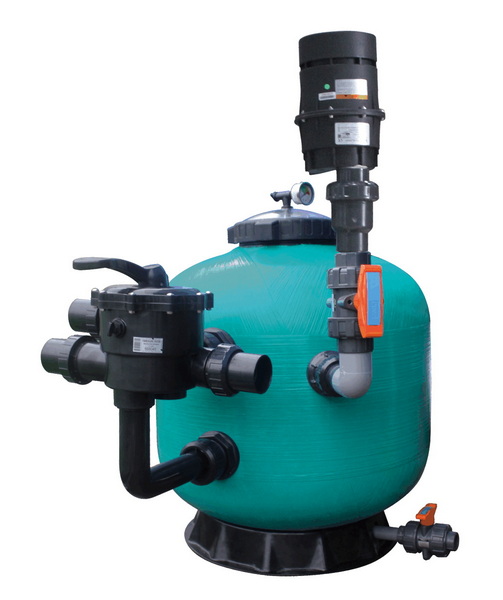
Thorough inspection is essential to avoid leaks, sand blow‑back, or internal damage that would undo your work after adding new media.[8][1]
- Rotate the lateral pipes outward and look for cracks, holes, or blocked slots; any damaged lateral must be replaced before the filter is put back into service.[1][8]
- Rinse the laterals and standpipe with a garden hose, and for clogged parts, soak them in a mild cleaning solution, then rinse thoroughly.[3][1]
- Inspect the inside of the tank for scale, sharp edges, or cracks; if the tank shell is damaged, replacement may be safer than repair.[16][8]
- Clean the inside walls with water and a soft brush, making sure no debris is left that could interfere with the new sand bed.[2][3]
- Place the standpipe and lateral assembly back into the tank, ensuring the laterals are fully unfolded and resting level on the bottom.[8][1]
- Center the standpipe in the opening so it lines up with the multiport or dome when reassembled later.[1]
Correct sand type, amount, and filling technique are critical to avoid damaged laterals and uneven filtration.[2][1]
- Use #20 silica sand explicitly labeled as pool filter sand, not play sand or construction sand, which can cloud water and clog the filter.[15][2]
- Check Pentair charts or the filter label for required sand weight; for example, Triton II and Tagelus models have specific capacities such as 100–650 lbs.[5][15]
- Some Triton II models require a base layer of pea gravel over the laterals followed by sand; use the specific pea gravel and sand quantities listed for that model.[10][5]
- Cover the opening at the top of the standpipe with tape or a rubber plug so no sand falls inside; sand in the standpipe can clog laterals and blow into the pool.[2][1]
- Fill the tank partially with water (to just above the laterals) before adding sand so the falling sand is cushioned and does not crack the laterals.[10][1]
- If using pea gravel, gently pour it first around the standpipe until the laterals are fully covered, then proceed with sand.[5][10]
- Add sand slowly and evenly around the standpipe, using your hand to deflect the flow and keep the standpipe centered in the opening.[2][1]
Stop periodically to level the sand bed by hand so it remains flat; an even bed helps maintain uniform flow and better filtration. Continue until the sand level reaches the manufacturer's specified height or the full bag weight has been added.[16][15][5][1]
Once the sand is in place, the filter must be carefully reassembled, then backwashed and rinsed before returning to normal filtration mode.[1][2]
- Remove the tape or plug from the standpipe, then lower the multiport valve or dome straight down, aligning it with the standpipe and tank opening.[8][1]
- Install the clamp band or bolts evenly, following Pentair torque and alignment guidelines, and ensure the main O‑ring is clean, lubricated, and seated correctly.[16][8]
- Reconnect unions and plumbing, making sure there is no strain on the valve body or fittings.[8]
- Replace the drain plug at the bottom of the tank so water does not leak out during start‑up.[6][2]
- Set the multiport valve to “BACKWASH,” open all valves, and only then restore power to the pump.[2]
- Start the pump and backwash for several minutes until the water in the sight glass runs clear; this removes fine dust and settles the sand bed.[11][2]
- Turn the pump off, set the valve to “RINSE,” and run again for 20–60 seconds to flush remaining fines to waste and prevent them returning to the pool.[2]
- Turn the pump off again, then set the valve to “FILTER” for normal operation and restart the system, checking for leaks at the clamp, unions, and drain plug.[1][2]
A fresh sand charge resets the filter's performance, and the pressure gauge reading immediately after rinsing becomes the new baseline “clean” pressure. Mark this value on the gauge or in the logbook; plan to backwash when pressure rises about 5–10 psi above this starting point for most residential systems.[4][2]
Under typical use, Pentair sand filters work best when the sand is replaced about every 3–5 years, though good maintenance and periodic sand cleaning can sometimes extend life to 6–7 years. If water remains cloudy, algae is more frequent, or backwash intervals become very short even with correct chemistry, it may be time for another sand change or a professional inspection.[12][13][11][3]
Changing the sand in a Pentair pool filter involves shutting down and depressurizing the system, removing old sand without damaging the laterals, and filling with the correct amount of #20 silica sand before carefully reassembling and backwashing. When performed every few years and combined with good chemistry and routine backwashing, this simple maintenance job keeps water crystal clear, reduces equipment strain, and extends the service life of both the pump and filter.[4][11][3][8][1][2]
Most Pentair‑style sand filters need a sand change every 3–5 years, depending on bather load, climate, and maintenance habits. Heavy use, poor water chemistry, or neglected backwashing can force more frequent changes, while meticulous care and occasional sand cleaning may stretch the interval to 6–7 years.[4][12][3]
Pentair sand filters typically use #20 silica “pool filter sand” with grain size around 0.45–0.55 mm, specially washed and graded for pool filtration. Play sand, masonry sand, or other ungraded sands are not suitable because they can create cloudy water, clog laterals, and reduce filtration performance.[15][2]
The required sand weight is usually printed on the filter's data label or in the product manual and varies by model; for example, a Pentair TR100 Triton II side‑mount filter uses about 600 lbs of sand. Many Pentair sand‑capacity charts list common models like Triton II, Tagelus, and Sand Dollar, along with the recommended sand and pea gravel quantities.[15][5][6][16]
Some modern media such as glass granules or lightweight filter balls are marketed as drop‑in replacements for sand, but they have different densities and flow characteristics, so the required volume may differ from the sand weight. Always confirm with the media manufacturer and the filter manual whether alternative media are approved for that specific Pentair model to avoid warranty issues or poor performance.[17][5][16][15]
A small amount of fine dust can appear in the pool if the filter is not thoroughly backwashed and rinsed after adding new sand, and this usually clears with proper backwashing and vacuuming. If larger grains repeatedly appear on the floor, there may be a cracked lateral, damaged standpipe, or incorrect media level that requires opening the filter and inspecting internals.[11][8][1][2]
Many homeowners comfortably handle a sand change themselves by following the manufacturer's instructions and the safety steps in this guide, especially on smaller residential filters. For large commercial filters, tight equipment rooms, or suspected internal damage (cracked tank, multiple broken laterals), hiring an experienced pool technician is often the safer and faster option.[16][8][2]
[1](https://www.swimmingpool.com/maintenance/pump&filter/changing-sand-in-your-pool-filter/)
[2](https://intheswim.com/blog/how-to-change-pool-filter-sand-2.html)
[3](https://www.groupebellemare.com/en/blog/change-pool-filtration-sand/)
[4](https://www.inyopools.com/Products/Questions/989/03500001005699.htm)
[5](https://premierpools.com/blogs/info/how-much-sand-does-your-filter-need)
[6](https://lesliespool.com/pentair-tr100-triton-ii-30-side-mount-sand-in-ground-pool-filter/387198.html)
[7](https://www.youtube.com/watch?v=oZLe9JFEs2Y)
[8](https://www.inyopools.com/HowToPage/how-to-replace-the-sand-in-a-pentair-triton-2-side-valve-sand-filter.aspx?CommentPage=1)
[9](https://www.facebook.com/farmjokester/videos/how-to-change-sand-in-your-pool-filter/1445213890225512/)
[10](https://www.youtube.com/watch?v=IBk6S8WXKxI)
[11](https://www.youtube.com/watch?v=KD7d-xN8JWw)
[12](https://www.reddit.com/r/pools/comments/13o3vfi/how_do_you_know_when_its_time_to_replace_the_sand/)
[13](https://www.facebook.com/groups/637529959937311/posts/2278347752522182/)
[14](https://www.reddit.com/r/swimmingpools/comments/c5fyrs/how_to_change_sand_in_this_sand_filter/)
[15](https://www.patiodrs.com/pages/pool-sand-filter-sand-chart)
[16](https://www.royalswimmingpools.com/tritondata.pdf)
[17](https://www.pentair.com/content/dam/extranet/nam/pentair-pool/residential/filters/triton-ii/triton-ii-fiberglass-sand-filter-english.pdf)
[18](https://www.youtube.com/watch?v=rsFIV1_1Uw0)
[19](https://www.instagram.com/reel/DK0aFbIvb0v/)
[20](https://www.youtube.com/watch?v=MnMP2Awhwgo)


