
Views: 222 Author: Tina Publish Time: 2026-01-18 Origin: Site


Content Menu
● Basic Safety Before Operating the Pump
● Understanding Your Pool Pump And Control System
● Step‑By‑Step: Manually Turning On a Pump With a Mechanical Timer
>> 3. Use the Timer's Manual Override
>> 4. Check for Proper Operation
● Step‑By‑Step: Manually Turning On a Variable‑Speed or Digital Pump
>> 1. Prepare and Pressurize Safely
>> 2. Power Up the Control Panel
>> 3. Use the Control Panel for Manual Run
>> 4. Select the Correct Speed
● Step‑By‑Step: Manually Turning On an Above‑Ground Pool Pump
>> 1. Check Water Level and Valves
>> 2. Prime the Pump (If Required)
● How To Prime a Pool Pump Before Manual Start
● Bypassing Timers and Automation for Manual Override
>> Digital Controller or Automation Override
● Energy‑Efficient Operation When Running the Pump Manually
>> Using Variable‑Speed Pumps Efficiently
>> System Design Tips for Better Flow
● Quick Troubleshooting When the Pump Will Not Start Manually
● Frequently Asked Questions (FAQ)
>> Q1: How long should I run my pool pump each day?
>> Q2: Can I damage the pump by running it manually?
>> Q3: Why does my pump lose its prime every time it shuts off?
>> Q4: Do I need to turn off the pump before changing the filter valve or switching modes?
>> Q5: Is it safe to control my pool pump with a smart plug or Wi‑Fi switch?
>> Q6: When should I call a professional instead of trying to start the pump myself?
Turning on a pool pump manually is an essential skill for every pool owner or technician. Whether you are bypassing a timer, testing new equipment, vacuuming the pool, or troubleshooting water flow issues, knowing how to operate the pump by hand helps keep the water clean, clear, and safe. This guide walks through safety steps, explains different pump and control types, and provides detailed procedures for manually starting and priming both in‑ground and above‑ground pool pumps.
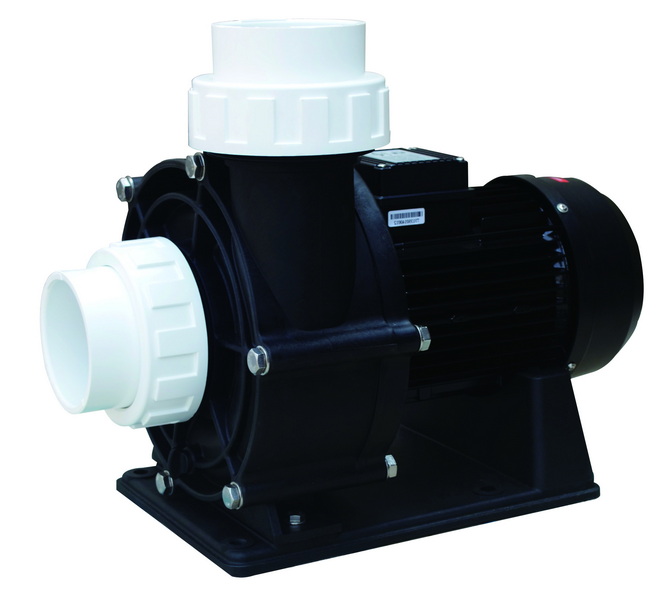
Always treat the pool pump and its controls as electrical and pressurized equipment. Before touching any switch, timer, or pump lid, take a moment to secure the area and protect yourself and the system.
- Turn off power at the main pool equipment breaker or disconnect before opening the pump lid or performing any work on wiring or internal components.
- Release pressure from the filter by opening the manual air relief valve on top of the sand, cartridge, or DE filter until air is purged and a steady stream of water flows out.
- Keep suction and return valves in correct positions when starting the system so water can circulate freely and pressure does not spike.
- Never place hands, feet, hair, or clothing near suction inlets; strong suction can cause serious entrapment injuries.
- Only a qualified electrician should change wiring, bypass built‑in timers, or install additional control devices.
If any part of the equipment pad is flooded, or if the motor or timer box is submerged or soaked, shut off power and wait for a professional inspection before using the pump.
Before turning the pump on manually, identify what kind of pump and controls you have. This helps you choose the right method and avoid damaging the system.
- Single‑speed pumps
- Traditional design that runs at one fixed speed whenever power is supplied.
- Typically controlled by a simple switch or mechanical timer.
- Two‑speed pumps
- Offer a low‑speed setting for routine filtration and a high‑speed setting for tasks like vacuuming or operating spa jets.
- Often controlled by a dedicated high/low switch or a more advanced timer or controller.
- Variable‑speed (VS) pumps
- Use an efficient, electronically controlled motor that can run at many different speeds.
- Usually have a built‑in digital control panel with programmable schedules, RPM settings, and sometimes smart‑home connectivity.
- Mechanical timer box
- Often mounted near the equipment pad in a weatherproof enclosure.
- Contains a rotating clock dial with ON/OFF trippers and a manual lever for override.
- Digital wall‑mounted or pad‑mounted controller
- Small screen or buttons labeled “Filter Pump,” “Pool,” “Spa,” or similar.
- Allows you to manually turn the pump on, adjust speed, and override schedules.
- On‑pump controls
- Some above‑ground and variable‑speed pumps have start/stop buttons and speed controls directly on the motor housing.
- May include multiple preset programs and basic timers.
Mechanical timers are very common in in‑ground pool systems with single‑speed or two‑speed pumps. They are usually inside a metal or plastic box with a round dial.
1. Ensure all suction and return valves are in normal operating positions so water can flow from the pool, through the pump and filter, and back to the pool.
2. Open the air relief valve on top of the filter to release trapped air; you will close it again later once water is flowing.
3. Confirm the pump basket lid is properly installed, and the o‑ring is seated and clean.
1. At the main electrical panel or sub‑panel, turn the pool equipment breaker to the ON position.
2. Do not touch any bare wires or terminal screws inside the timer box; only use the external switch or lever designed for the user.
1. Open the timer door and locate the rotating clock dial and the ON and OFF trippers.
2. Find the manual lever or arm, often labeled ON/AUTO/OFF or something similar.
3. Move the lever from AUTO or OFF to the ON position. This bypasses the schedule and immediately sends power to the pump.
1. The pump motor should start running with a steady humming sound.
2. Look through the clear pump lid: the basket area should begin filling with water within 30–60 seconds if the pump is properly primed.
3. Once you see a steady stream of water and no large air pockets, close the air relief valve on the filter to seal the system.
1. To stop the pump manually, move the timer lever back to OFF or AUTO.
2. In AUTO mode, the pump will return to following the programmed ON/OFF schedule.
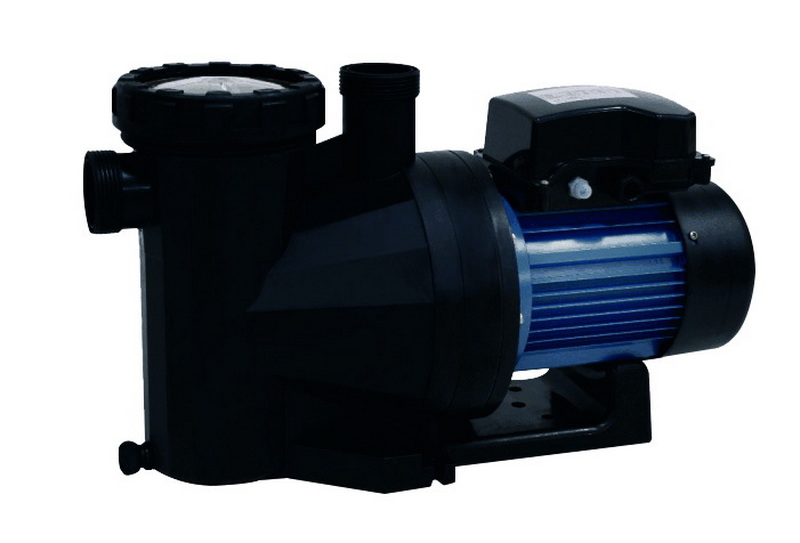
Variable‑speed pumps and some advanced single‑speed units have on‑board electronics and a small keypad or display. Manual operation is done through this panel or a linked automation system.
1. Confirm that suction and return valves are open and that the pump basket lid is properly sealed.
2. Open the air relief valve on the filter to bleed trapped air when the pump starts.
1. Turn the appropriate breaker ON at the electrical panel.
2. Wait for the pump's control screen to light up and cycle through any startup messages.
1. Locate the main start/stop or “Filter Pump” button on the keypad.
2. Press START or ON to begin a manual run.
3. If the pump uses preset speeds (for example, Speed 1, Speed 2, Quick Clean), select a moderate speed suitable for filtration.
- For normal daily filtration
- Choose a medium or low RPM that maintains good circulation. Lower speeds reduce noise and energy use while still turning over the water.
- For vacuuming, backwashing, or running water features
- Select a higher speed setting temporarily to provide stronger flow.
- After finishing the task, switch back to the normal filtration speed.
1. Press the start/stop button again to shut down the pump.
2. If automation is used, make sure the system is returned to AUTO mode so scheduled cycles continue.
Above‑ground pool systems are often more compact, and many pumps plug into a standard outlet with a simple built‑in switch.
1. Make sure the water level in the pool is at least halfway up the skimmer opening so the skimmer does not suck air.
2. Confirm any valves between the pool and pump are open and not partially closed or blocked.
Some above‑ground pumps are non‑self‑priming and work best when the pump housing is filled with water before start‑up.
1. Turn off power at the outlet or breaker.
2. Remove the clear lid from the pump basket area.
3. Use a bucket or hose to fill the pump housing with clean water until the basket chamber is completely full.
4. Check the lid o‑ring for cracks, dirt, or flattening. Clean or replace if necessary, then reinstall the lid tightly.
1. Plug the pump into a GFCI‑protected outlet if it uses a cord and plug.
2. Flip the switch on the motor housing to ON or press the start button.
3. Watch the pump basket: it should fill with water within 30–60 seconds. If it does not, stop the pump and repeat the priming steps.
1. Check that water is returning to the pool through the return jets with steady force.
2. Listen for unusual noises like loud grinding, repeated clicking, or excessive vibration, which may indicate mechanical issues.
Priming removes air from the pump and suction lines so the impeller can move water efficiently. A poorly primed pump may run but fail to circulate water, leading to overheating and damage.
- After the system has been drained for maintenance or winterization.
- When the pump has been moved or reinstalled.
- If the pump loses prime and the basket is mostly full of air rather than water.
1. Turn Off All Power
- Make sure the pump cannot start while you are working. Turn the breaker or disconnect switch off.
2. Set Valves and Filter
- Open the suction and return valves to normal operating positions.
- If your filter has a multi‑port valve, some manufacturers recommend using the “Recirculate” setting during priming to bypass the filter and reduce resistance.
- Open the air relief valve at the top of the filter.
3. Open the Pump Lid
- Unscrew or release the clear pump lid.
- Remove any leaves, debris, or obstructions in the basket.
4. Fill the Housing With Water
- Place a garden hose or a bucket inside the basket area and fill the housing completely.
- For many systems, 2–3 gallons of water is enough to help the pump catch prime quickly.
5. Inspect and Reseat the Lid O‑ring
- Wipe the o‑ring clean and check for cracks or flat spots.
- Apply a thin layer of pool‑safe silicone lubricant if recommended by the manufacturer.
- Place the lid back on the pump and tighten firmly by hand.
6. Restore Power and Start Manually
- Turn the breaker back on.
- Use the timer's manual ON setting, the pump's start button, or the on‑unit switch to start the pump.
7. Verify Successful Priming
- Look through the clear lid: the basket area should fill with water and push out most air.
- Air and water will initially escape from the filter's air relief valve; once a solid stream of water appears, close the valve.
- If water does not flow properly within about a minute, shut off the pump, repeat the priming process, and check for air leaks on the suction side.
- Photo series showing the lid being removed, the basket being cleaned, water being poured into the housing, and the lid reinstalled.
- Close‑up photo of a properly lubricated o‑ring and the lid being tightened.
There are many situations where you may need to run the pump outside its normal schedule, such as shocking the pool after a storm, doing an extended vacuuming session, or testing new filter settings. In these cases, using a proper manual override is safer than changing wiring.
- Locate the manual lever labeled ON/AUTO/OFF.
- Switch it to ON to keep the pump running continuously until you switch it back.
- After you finish the task, return the lever to AUTO to resume the normal programmed schedule.
- Look for a mode or button labeled “Service,” “Manual,” or “Filter Pump.”
- Press the pump button to force the pump ON, even if the schedule would normally have it off.
- When the work is done, switch the system back to AUTO or NORMAL so it follows programmed times again.
- Do not attempt to bypass internal timers by moving wires or jumping terminals unless you are a licensed electrician.
- If the pump fails to respond to manual commands or trips the breaker repeatedly, professional diagnosis is recommended to avoid electrical hazards and equipment damage.
Manual control is a good opportunity to think about efficiency and long‑term operating costs. Variable‑speed pumps in particular are designed to save energy while maintaining good circulation.
- Run at low or medium speeds for routine filtration for longer periods instead of short, high‑speed bursts.
- Use higher speeds only when necessary for vacuuming, spa jets, heating, or water features.
- Take advantage of the built‑in programmable clock to schedule low‑speed operation during off‑peak electrical rate periods, if available.
- Use larger‑diameter plumbing where possible to reduce resistance and improve flow.
- Avoid unnecessary elbows, tight bends, and small restrictive valves.
- Keep filters clean and backwash or replace cartridges according to manufacturer guidelines so the pump does not have to work harder than necessary.
Sometimes the pump does not behave as expected even after you follow all manual start steps. Use these checks before calling for service.
- Check Power Sources
- Make sure the breaker is in the ON position and has not tripped.
- Reset any GFCI outlets used by an above‑ground pump.
- Inspect Timer or Controller Settings
- Verify that the mechanical timer's manual lever is firmly in the ON position.
- On digital systems, confirm the pump is not in a “Disabled” or “Error” state.
- Listen to the Motor
- A humming sound with no rotation can indicate a bad capacitor or a jammed impeller.
- Loud grinding or scraping noises may mean internal wear or bearing failure.
- Check For Air Leaks
- If the pump loses prime quickly after shut‑down, inspect the pump lid, o‑ring, unions, and suction fittings for air leaks.
- Tighten connections and replace worn seals.
- Evaluate Water Flow
- If the pump runs but flow is weak, check for clogged skimmer baskets, pump basket blockages, or a very dirty filter.
- Clean or backwash the filter and recheck pressure and flow.
If repeated attempts to start the pump manually fail, or if breakers trip multiple times, stop using the system and schedule a professional inspection.
Manually turning on a pool pump is a fundamental skill that keeps your pool water healthy and gives you full control over filtration, cleaning, and troubleshooting. By starting with basic safety, identifying your pump type and control system, and following clear steps to prime the pump and use timer or keypad overrides, you can confidently start the pump whenever you need it. Mechanical timers allow simple ON/AUTO switching, while variable‑speed pumps offer precise manual control over speed and run time, helping you balance performance and energy efficiency. When problems arise—such as loss of prime, weak flow, or tripped breakers—systematic checks of power, valves, seals, and filters often reveal the cause. For anything involving wiring changes or persistent electrical faults, always rely on a qualified professional. With these guidelines, manual pump operation becomes straightforward, safe, and efficient for both everyday use and special maintenance tasks.
Contact us to get more information!
Most residential pools run the pump between 8 and 12 hours per day to ensure that the full pool volume is circulated at least once. The exact time depends on pool size, pump speed, plumbing design, and environmental factors such as debris load and sunlight. Variable‑speed pumps can often run longer at lower speeds to save energy while maintaining circulation.
Using the manual ON function itself does not harm the pump as long as the system is primed and valves are set correctly. Damage occurs when the pump runs dry, runs against closed valves, or operates with severely clogged filters, which can overheat the motor and wear out seals. Always verify water flow and check pressure gauges after turning the pump on manually.
Frequent loss of prime usually indicates an air leak on the suction side of the system. Common sources include a cracked or dirty lid o‑ring, loose unions, fitting leaks, or a low water level that allows air to enter through the skimmer. Inspect and replace worn seals, tighten connections, and maintain the water level at the proper height to keep the pump primed.
Yes, the pump should always be turned off before moving a multi‑port valve handle between settings like Filter, Backwash, Rinse, or Waste. Changing positions while the pump is running can damage the valve, create dangerous pressure spikes, and stress the plumbing. After the handle is locked in the new position, you can turn the pump back on manually.
Small above‑ground pumps that plug into standard outlets can sometimes be controlled with a properly rated smart plug, but you must match voltage and current ratings carefully. For in‑ground or hard‑wired pumps, especially higher‑horsepower units, only dedicated pool‑rated controls and automation systems installed by a professional should be used. Incorrect devices can overheat, fail prematurely, or create electrical hazards.
You should call a professional if breakers trip repeatedly, if the pump hums but will not start, if smoke or burning smells are present, or if water has flooded the equipment pad. Also seek expert help before attempting any wiring changes, internal timer bypasses, or major equipment upgrades. Safe manual operation focuses on switches and controls, not on modifying the electrical system.
1. https://www.youtube.com/watch?v=SPOzgmXgTlk
2. https://www.youtube.com/watch?v=Cbp6sd8By0A
3. https://www.reddit.com/r/pools/comments/1d1exe0/help_request_how_to_turn_on_this_pool_pump/
4. https://www.facebook.com/groups/637529959937311/posts/2593108027712818/
5. https://www.wikihow.com/Prime-a-Pool-Pump
6. https://images.thdstatic.com/catalog/pdfImages/f9/f9f46ddf-df98-4a00-9a4b-c85a75307e11.pdf
7. https://lesliespool.com/single-speed-pumps/
8. https://www.thepoolfactory.com/blogs/equipment/how-to-prime-an-above-ground-pool-pump
9. https://www.reddit.com/r/pools/comments/1h27bpq/bypassing_built_in_pump_timer/
10. https://www.youtube.com/watch?v=20RLr0afvSc
11. https://images.inyopools.com/cloud/documents/pool-pump-owners-manual.pdf
12. https://blog.royalswimmingpools.com/blog/single-two-or-variable-speed-pool-pumps-what-are-the-real-differences
13. https://mrpoolman.com.au/blogs/news/how-to-install-and-prime-a-pool-pump
14. https://www.waterheating.co.nz/storage/files/shares/Manuals/Time%20Clock%20Bypass%20with%20Wiring%20Diagram.pdf


