
Views: 222 Author: Tina Publish Time: 2025-12-07 Origin: Site


Content Menu
● When to change pool filter sand
● Tools, materials, and safety gear
● Step 1: Turn off and depressurize the system
● Step 2: Disconnect plumbing and remove the valve or lid
● Step 3: Protect the standpipe and internal parts
● Step 5: Inspect and clean the tank and laterals
● Step 6: Choose the right sand and amount
● Step 7: Fill the tank halfway with water
● Step 8: Add new sand slowly and evenly
● Step 9: Reassemble the filter and reconnect plumbing
● Step 10: Backwash, rinse, and start filtering
● Extra tips for better performance
● FAQ
>> 1. How often should pool filter sand be changed?
>> 2. What type of sand should I use in my pool filter?
>> 3. How do I know how much sand my filter needs?
>> 4. Is it safe to change the sand myself, or should I hire a professional?
>> 5. Why is sand coming back into my pool after changing the sand?
>> 6. Can I reuse my old sand after cleaning it?
How to change the sand in a pool filter is a straightforward DIY job if you prepare the right tools, follow safety steps, and work carefully around the filter's internal parts. Doing it correctly restores filtration performance, clears cloudy water, and helps extend the life of your pool pump and filter system.[1][2][3][4]
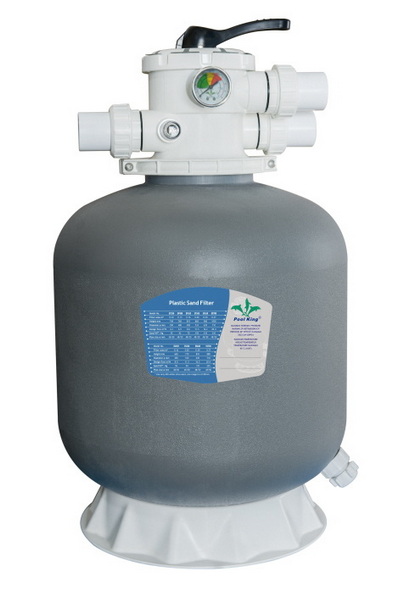
A sand filter traps dirt, oils, and debris as pool water passes through a bed of specially graded filter sand, usually to about 20 microns. Over time this media becomes compacted and saturated, so the filter can no longer clean effectively even after backwashing.[5][6][7][1]
Most residential pool sand filters use #20 grade silica sand with a grain size of about 0.45–0.55 mm, which balances fine particle capture and good water flow. Some owners upgrade to alternative media like zeolite or glass, which can capture smaller particles and last longer than traditional silica sand.[8][9][5]
In normal residential use, filter sand typically needs replacement every 3–5 years, although heavy bather loads or poor water chemistry can shorten this interval. Check your filter manual, because some manufacturers specify a maximum media life or service interval for best performance.[10][3][6]
Common signs that sand needs to be replaced include persistently cloudy water, short backwash cycles, high filter pressure that does not drop after backwashing, or sand returning to the pool from the returns. Visible channeling in the sand bed or “mud balls” during inspection are also strong indicators that it is time for new media.[2][11][4][1]
Before starting, gather all tools and materials so you can complete the job without rushing. Working methodically reduces the risk of damaging the tank, valve, or laterals.[3][2]
You will typically need:
- New filter media: #20 silica sand or an approved alternative, in the quantity specified on your filter label or manual.[12][8]
- Basic hand tools: screwdrivers, pliers, wrenches, and any special clamp or union tools used on your system.[11][2]
- Shop vacuum and buckets or scoops for removing old sand.[2][3]
- Garden hose for rinsing the tank and components.[6][2]
For safety and comfort, also prepare:
- Safety glasses, closed-toe shoes, and work gloves to protect skin and eyes from debris and bacteria in the old sand.[3][2]
- An N95 or similar dust mask to avoid inhaling silica dust when pouring new sand.[11][3]
- A towel or long-sleeved shirt, especially when reaching into fiberglass tanks to avoid irritation.[10][3]
Always shut off power to the pool pump at the switch and, if possible, at the breaker to prevent accidental start-up. Close any valves on the suction and return lines so that water does not siphon out of the pool while the system is open.[6][2][3]
Next, release pressure from the filter by opening the air relief valve or briefly setting the multiport valve to “waste” with the pump off. Once pressure is relieved, remove the drain plug at the bottom of the filter tank and let all water drain out into a safe area.[4][2][3][6]
Most sand filters are either top-mount with a multiport valve on top or side-mount with a separate top cover; your approach depends on the style. For top-mount models, loosen unions or disconnect flexible hoses from the valve ports, then remove the clamp or band that secures the valve to the tank.[2][3][11]
Gently twist and lift the valve or lid straight up, taking care not to crack or bend the central standpipe that extends into the tank. If plumbing is rigid PVC, you may need to cut and later re-glue sections or unscrew unions carefully, which makes a detailed photo or video especially helpful here.[13][14][11][2]
Once the valve or lid is removed, you will see the top of the sand bed and the central standpipe leading down to the laterals. To avoid filling this pipe with sand, cover its opening with tape, a rubber cap, or a small plastic bag secured with a rubber band.[11][2]
Keeping the standpipe centered and protected while you remove and replace sand prevents clogs and protects the internal plumbing. A clear close-up image or a short video of properly covering the standpipe helps readers avoid one of the most common mistakes.[4][11]
Old filter sand is heavy, so plan for the weight and disposal before you start. The easiest method is to use a wet/dry shop vacuum to suck the sand out of the tank, emptying the vacuum into buckets or a wheelbarrow as needed.[12][3][2]
If a vacuum is not available, scoop sand out by hand or with a small container, taking care not to strike or bend the laterals at the bottom. As you approach the laterals, switch to gentle hand removal to avoid breaking them and to reveal any damage that may have occurred.[6][2]
With the sand removed, the laterals (the small “fingers” or arms at the bottom of the standpipe) should be fully visible for inspection. Check each lateral for cracks, splits, or missing end caps, since damage here often leads to sand blowing back into the pool.[15][4][6]
Replace any damaged laterals or the entire lateral assembly if necessary, following your filter's parts diagram or manual. Use a garden hose to thoroughly rinse the inside of the tank, flushing out remaining sand and debris so that the new media sits on a clean surface.[10][3][2][6]
Always match the media type and quantity to your specific filter model; this information is usually printed on the tank label or in the owner's manual. Most sand filters are designed for #20 silica pool filter sand with a defined grain size, but some allow alternatives such as zeolite or glass media.[8][5][12]
As an example, a typical 19–20 inch filter may require around 40–50 kg of #20 silica sand, while a 24 inch model may need about 150–300 lb depending on the design. Larger filters (around 30 inches and above) sometimes use a layer of pea gravel at the bottom to support the sand bed; check for this requirement before filling.[8][3][12]
Before pouring new sand, reinstall or confirm the drain plug is secure, then fill the filter tank about halfway with clean water. This water cushions the laterals and standpipe so they are not stressed by the sudden weight of dry sand.[16][15][3]
Make sure the standpipe remains centered and the top opening stays covered as the tank fills. A photo or short clip showing the water level relative to the tank height can help users avoid overfilling at this stage.[4][11]
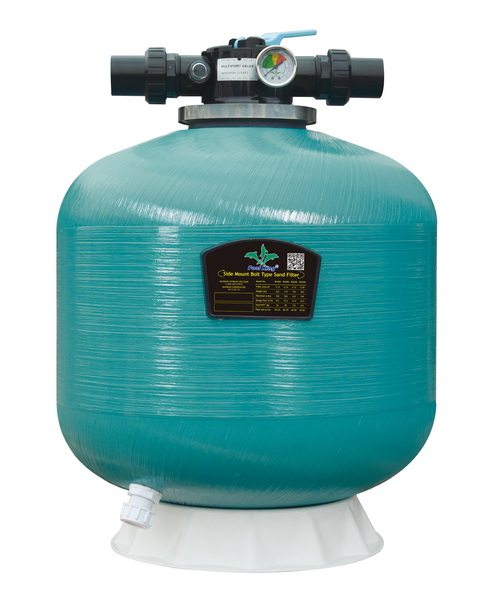
With the tank half-full of water and the standpipe protected, begin pouring new sand into the tank using a small scoop or by carefully tipping each bag. Pour slowly and move around the tank as you go so that the sand distributes evenly and does not push the standpipe off-center.[1][16][3]
Continue until the sand reaches the manufacturer's recommended level, usually marked on the tank or specified as a fill height above the laterals. During this step, wear your dust mask and safety glasses to avoid inhaling silica dust or getting particles in your eyes.[3][12][8][11]
Once the sand is in place and settled, carefully clean the tank rim and the underside of the valve or lid so sealing surfaces are free of grit. Remove the cover from the standpipe, then lower the multiport valve or top cover straight down so it slides over the standpipe without forcing or twisting.[2][3][11][4]
Reinstall the clamp or band evenly and tighten according to the manufacturer's instructions, then reconnect unions or hoses to the pump, return, and any other relevant ports. Check that the spider gasket, o-rings, and seals are clean and lubricated with an appropriate pool silicone lubricant, replacing any that look worn or cracked.[3][4][2]
Before sending water back to the pool, set the multiport valve to “backwash” and open all valves on the suction and return lines. Turn the pump on and backwash the filter until the sight glass runs clear, usually for two minutes or more, to flush out fine dust and loose particles from the new sand.[4][3]
Next, turn off the pump, set the valve to “rinse,” and run for about 20–60 seconds to re-compact the sand bed and avoid a burst of cloudy water into the pool. Finally, shut the pump off again, move the valve to “filter,” and restart the system, checking for leaks around the clamp, drain plug, and unions.[10][3][4]
A clean, correctly filled sand filter should show a stable “clean” pressure reading; note this value so you know when to backwash in the future. As the filter collects debris, pressure rises; backwashing is typically recommended when pressure increases 8–10 psi above the clean baseline.[7][3][4]
Avoid using regular play sand or construction sand, which have unsuitable grain sizes and impurities that can damage equipment or cloud the water. Stick to high-purity, properly graded pool filter sand or approved alternatives, and follow your filter manufacturer's instructions for media type and quantity.[9][5][8]
For your article layout and media-rich presentation, consider:
- Inserting a diagram image of a sand filter cutaway showing sand bed, standpipe, and laterals.
- Embedding a full-length instructional video that walks through a complete sand change from start to finish.[17][18]
- Including short looped clips (GIFs or muted videos) for critical actions like lifting the valve, covering the standpipe, and starting backwash.
Changing the sand in a pool filter is a manageable project that restores filtration efficiency, saves energy, and improves water clarity when done on the right schedule. With proper safety gear, the correct type and amount of sand, and careful attention to the internal parts of the filter, most pool owners can complete this job confidently in an afternoon.[1][6][2][3]
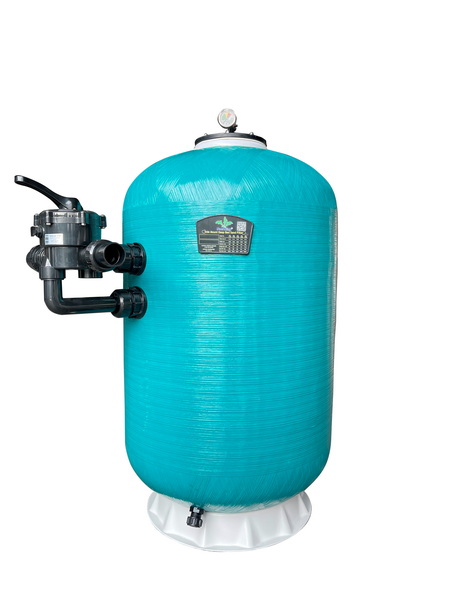
Most pools need a complete sand change every 3–5 years, though heavy use, algae problems, or poor water balance can shorten that interval. Follow your filter manual, and also watch for signs like persistent cloudiness or short backwash cycles to decide when it is time.[7][6][10][4]
Use specially graded #20 silica pool filter sand with a grain size around 0.45–0.55 mm, or another media explicitly approved by your filter manufacturer. Regular beach, play, or construction sand is not suitable because it has the wrong particle size and may contain impurities that harm your system.[5][9][8]
The required sand weight is usually printed on the filter tank label or in the owner's manual, often in pounds or kilograms. Typical residential filters range from about 40–50 kg for small units up to 150–300 lb or more for larger 24–30 inch models.[12][8]
A careful DIYer can safely change sand by following step-by-step instructions, shutting off power, relieving pressure, and using proper safety gear. If your system has complex plumbing, difficult access, or you are unsure about disassembly and reassembly, hiring a qualified pool technician is a good option.[6][10][3]
Sand returning to the pool usually indicates damaged laterals, a cracked standpipe, or too much sand in the tank. Inspect and replace broken internal parts and verify that you used the correct sand type and weight, then backwash and rinse thoroughly before returning to filter mode.[3][6][4]
Reusing old sand is not recommended because the grains become rounded, compacted, and loaded with oils and debris over time. Fresh media ensures effective filtration, better water clarity, and less strain on your pump and filter.[7][1][10][6]
[1](https://www.swimmingpool.com/maintenance/pump&filter/changing-sand-in-your-pool-filter/)
[2](https://www.thepoolfactory.com/blogs/pool-care/how-to-change-the-sand-in-a-pool-filter)
[3](https://lesliespool.com/blog/how-to-change-pool-filter-sand.html)
[4](https://www.swimuniversity.com/change-pool-filter-sand/)
[5](https://beatbot.com/blogs/pool-cleaning-kits/different-types-of-sand-for-pool-filters-and-how-to-choose-the-right-one)
[6](https://splashfiberglasspoolcompany.com/a-guide-to-know-how-often-to-change-sand-in-pool-filter/)
[7](https://intheswim.com/blog/pool-filter-sand.html)
[8](https://poolsreno.co.za/sand-filter-calculator-how-much-sand-do-you-need/)
[9](https://hyclor.com.au/best-sand-for-pool-filter/)
[10](https://romanellipools.com/blogs/how-to-change-the-sand-in-your-pool-filter-step-by-step-guide/)
[11](https://intheswim.com/blog/how-to-change-pool-filter-sand-2.html)
[12](https://www.thepoolfactory.com/blogs/equipment/how-much-sand-to-use-with-your-sand-filter-system)
[13](https://www.youtube.com/watch?v=ZNH9JLufzUM)
[14](https://www.youtube.com/watch?v=LB3tuaYfpnc)
[15](https://www.facebook.com/groups/637529959937311/posts/2223635441326747/)
[16](https://www.youtube.com/watch?v=VxIsKhGyZXQ)
[17](https://www.youtube.com/watch?v=v9ghBgNkv-4)
[18](https://www.youtube.com/watch?v=E6e0TX6Wxo0)
[19](https://www.reddit.com/r/swimmingpools/comments/c5fyrs/how_to_change_sand_in_this_sand_filter/)
[20](https://www.facebook.com/groups/637529959937311/posts/2550625005294454/)


